By TruckBiz Team · Updated October 16, 2026
An FMCSA SAFER Company Snapshot brings together registration details, inspections, reported crashes and a safety rating. It is a useful starting point when reviewing a trucking company, provided you match the record to the business and understand each field.
For a whole-company purchase, compare the snapshot with the LLC or corporation's documents and the written sale terms. Use it to build a list of questions, then collect supporting records before committing.
1. Open the official FMCSA SAFER Company Snapshot
Open the FMCSA Company Snapshot. Search by USDOT number, MC/MX number or name. When you have the USDOT number, use it to locate the record. If searching by name, check the returned identity carefully.
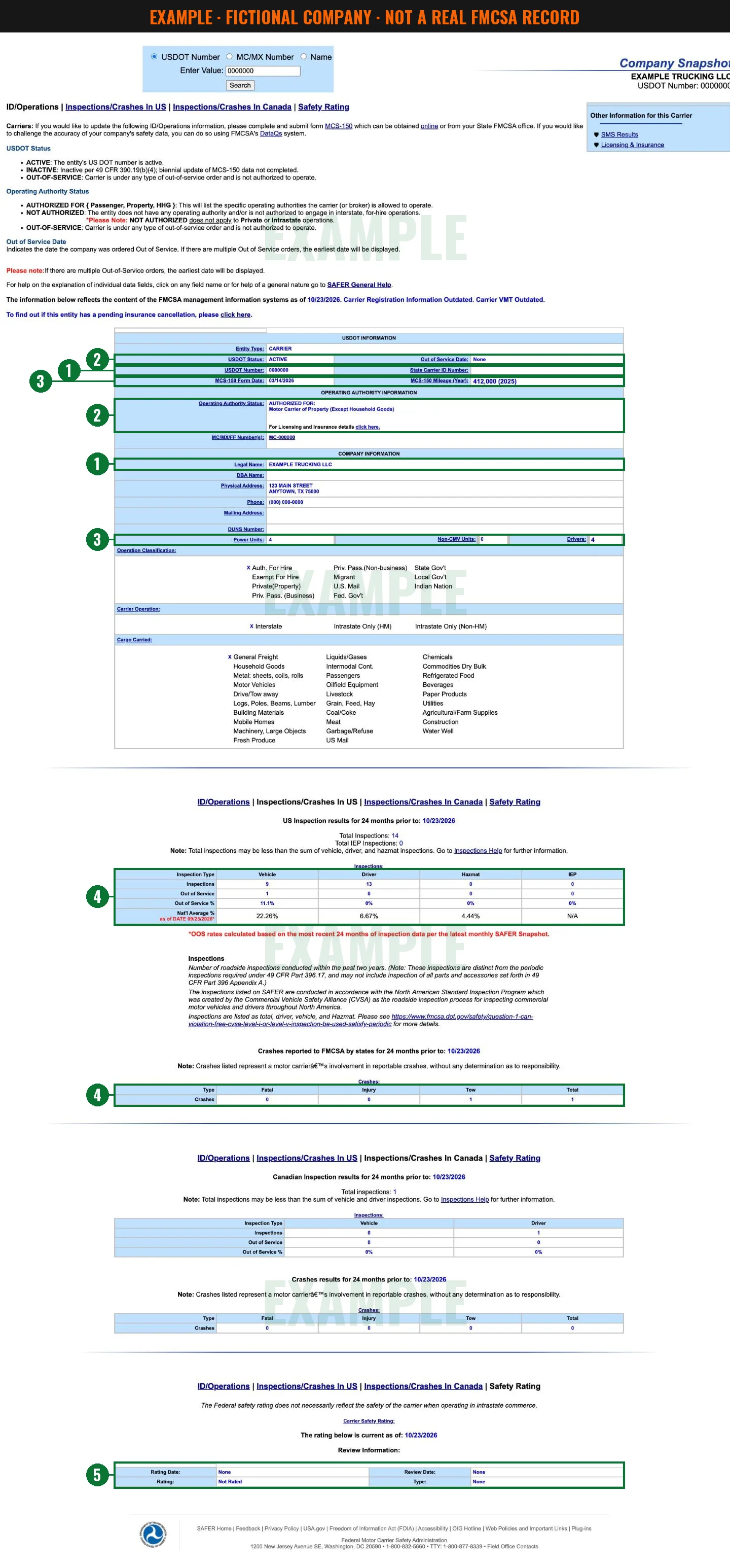
Save the page and your check date. Also record its data date: the captured snapshot says the information reflects FMCSA systems as of October 14, 2026. That is separate from the October 16 capture date. Do not assume every field describes today's business. [1]
A seller's screenshot can help frame questions. Open the official record yourself and compare its phone number and addresses with the company documents and the person you are dealing with.
2. Match the company before judging its record
Compare the legal name, USDOT number and MC/MX/FF numbers with the documents for the business you intend to buy. Note differences in its physical address, mailing address, phone or trade name.
The Help page describes the USDOT number as an identifier for the carrier or shipper. MC/MX/FF numbers relate to operating authority. Record both rather than treating them as interchangeable. Our MC and USDOT guide provides more background. [2]
Ask for formation papers and check the state business record. The purchase agreement should identify the same legal entity. If a carrier uses a trade name, ask how that name relates to its legal name.
A mismatch needs a documented explanation. It does not, by itself, prove fraud; a verbal explanation does not settle it either.
3. Read the status fields separately
Copy USDOT Status, Operating Authority Status and Out of Service Date separately. The snapshot defines the status values as follows: [1]
- ACTIVE: the entity's USDOT number is active. Still check its authority for the planned work.
- INACTIVE: the required biennial MCS-150 update was not completed.
- AUTHORIZED FOR: read the specific authorities listed, including any passenger, property or household-goods limits.
- NOT AUTHORIZED: the entity lacks operating authority and/or is not authorized for interstate, for-hire operations. The snapshot expressly says this label does not apply to private or intrastate operations.
- OUT-OF-SERVICE: the carrier is under an out-of-service order and is not authorized to operate.
Out of Service Date identifies when the company was ordered out of service. Where multiple orders exist, SAFER displays the earliest date. If the date is blank or says None, confirm the company's status rather than treating that entry alone as permission to operate. [1][2]
Resolve an inactive number, unclear authority or out-of-service entry with supporting records and FMCSA before proceeding.
4. Check the MCS-150 date, power units and drivers
The Help page defines MCS-150 Form Date as the date from the registration form. Treat it as a form date, not a founding date or proof of continuous operation. Use formation documents to investigate when the business was established. [2]
The registration rule in 49 CFR 390.19T(b) provides a 24-month update schedule for entities covered by that requirement. Failure to complete required biennial updates can lead to USDOT deactivation. Check the applicable schedule rather than judging compliance from the displayed date alone. [3]
Power Units counts listed vehicle types, including trucks, tractors and buses, owned or leased by the carrier. Drivers is the number employed by the carrier or shipper in the Help definition. Read these as figures reported by the carrier on its MCS-150 registration form, then ask how they compare with the business today. [1][2]
Do not assume an exact refresh interval, current staffing or equipment ownership from these counts. Ask which equipment, if any, is included in the sale and put that answer in writing.
5. Read inspections and crashes in context
The captured US inspection section covers the 24 months before October 14, 2026. Read the period displayed on the record you check. Vehicle inspections include levels 1, 2, 5 and 6; driver inspections include levels 1, 2, 3 and 6; hazmat inspections include levels 1–6 when hazardous materials are present. One inspection can appear in several categories, so do not add the columns to reconstruct the total. [1][2]
The table also displays IEP. If that column matters to the business, ask FMCSA what its results cover rather than guessing.
For each category, Out of Service % is the count of inspections with an out-of-service result divided by that category's inspection count, multiplied by 100. One inspection may involve several violations; the row counts inspections with an OOS result, not individual violations. [2]
Compare rates with the inspection counts and ask for underlying reports. A small number of inspections provides less evidence than a larger record.
Use the national-average row with its own date. The captured snapshot shows September 25, 2026, and states: “OOS rates calculated based on the most recent 24 months of inspection data per the latest monthly SAFER Snapshot.” Preserve that context when comparing a carrier; do not assume it is a calendar-year benchmark. [1]
The US crash section covers state-reported crashes for the 24 months before its displayed date. Each crash appears once at its highest severity: fatal, injury or tow. The three categories add up to the total. Reporting involvement does not determine responsibility. [1][2]
Under 49 CFR 390.5T, the accident definition covers a commercial motor vehicle operating on a highway in interstate or intrastate commerce, with a death, injury followed by immediate medical treatment away from the scene, or disabling damage requiring a vehicle to be transported away. It excludes occurrences involving only boarding or leaving a stationary vehicle, or only loading or unloading cargo. [4]
Ask for crash records and insurer claims reports, often called loss runs. A zero in this window does not answer every question about earlier events or claims.
6. Check the safety rating and its date
Record the rating, Rating Date and Review Date as displayed. SAFER Help describes Satisfactory as no evidence of substantial noncompliance, Conditional as noncompliance with one or more safety requirements, and Unsatisfactory as evidence of substantial noncompliance. [2]
49 CFR 385.3 defines an unrated carrier as one to which FMCSA has not assigned a safety rating. That absence is neither a finding of unsafe operation nor a positive safety finding. [5]
If the rating displays None, record it literally rather than automatically replacing it with Unrated. Likewise, do not infer operating permission from any rating alone. For an adverse rating, confirm applicable restrictions and orders with FMCSA before proceeding.
7. Continue beyond SAFER before deciding
Use the snapshot's Licensing & Insurance link for further authority and insurance checks. Follow the link on the record you are reviewing rather than relying on an older saved lookup address. [1]
Our due-diligence checklist helps organize broader requests: ownership documents, insurance information, lien searches, debt disclosures and sale terms. Read How to spot an MC scam for further questions.
For each unresolved issue, record the field, supporting document needed and person responsible for confirming it. Take insurance questions to your insurance agent and ownership or debt questions to your lawyer and accountant.
FAQ
Can I search SAFER with an MC number?
Yes. Use the MC/MX search option, then match the returned company identity. [1]
Does an active USDOT number settle the authority check?
No. ACTIVE describes the number's status. Read the separate authority line for the planned operation. [1]
Does Unrated mean unsafe?
No. Under 49 CFR 385.3, it means no safety rating has been assigned. Continue reviewing the record. [5]
Does a reported crash mean the carrier was at fault?
No. The snapshot expressly separates crash involvement from responsibility. [1]
Is a snapshot enough to buy a company?
Use it as a starting point alongside company documents, financial records, insurance information and written sale terms.
Sources
Primary SAFER pages captured October 16, 2026. CFR references use the October 1 eCFR API extracts documented in the supplied research notes.
- FMCSA Company Snapshot, captured record.
- FMCSA SAFER field definitions.
- 49 CFR 390.19T — registration updates.
- 49 CFR 390.5T — accident definition.
- 49 CFR 385.3 — safety rating definitions.
General information, not legal, tax or insurance advice. TruckBiz is not affiliated with or endorsed by FMCSA or the U.S. DOT.